Turn any DPP
into a real mock test.
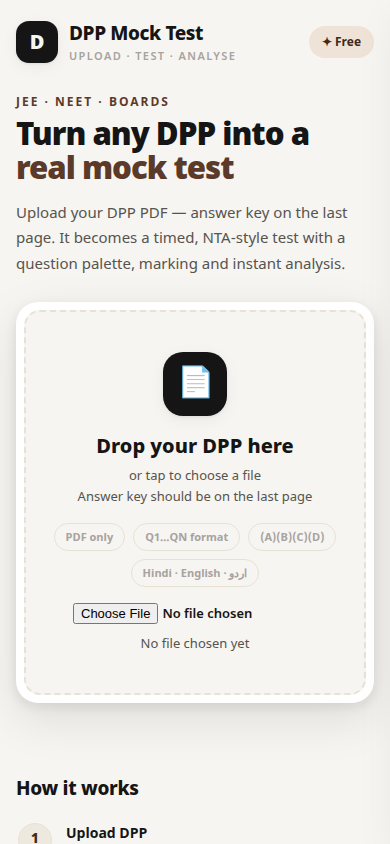
Upload your DPP PDF. Pariksha reads the questions and the answer key, checks them with you, then runs a proper NTA-style test — timer, question palette, marking, and a full result analysis.
Free. No ads. No account. Your PDFs never leave your phone.
Three steps. Then you are testing.
No typing questions by hand. No screenshots. The app does the boring part — you do the exam.
Upload the DPP
Pick any DPP PDF — Hindi, English or Urdu. The app reads the questions, the options and the answer key from the last page.
Check & fix
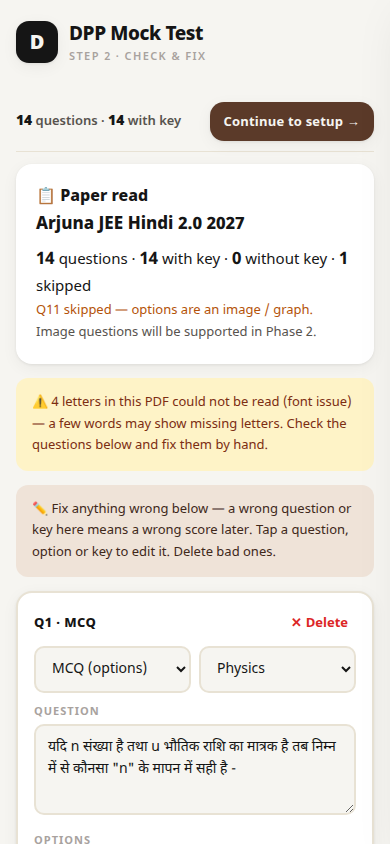
Before the test starts you see every question. Fix a wrong letter, change a key, delete a bad question, or add one by hand. Nothing is locked in.
Take the test
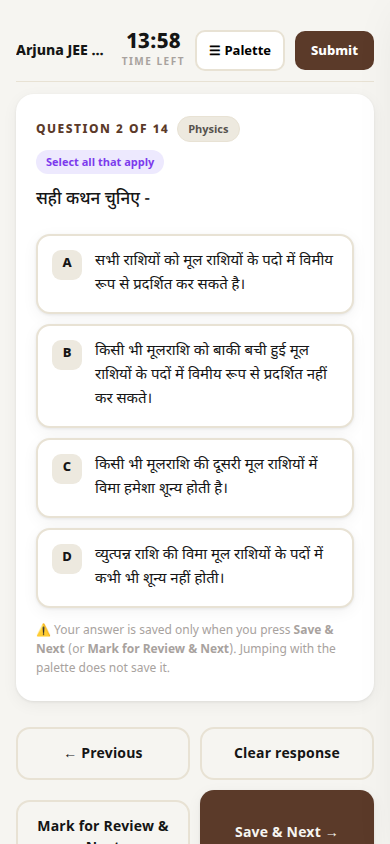
NTA-style screen — timer, subject tabs, question palette, Save & Next, Mark for Review. Submit and get your score, accuracy, time per question and a full review.
See it in action
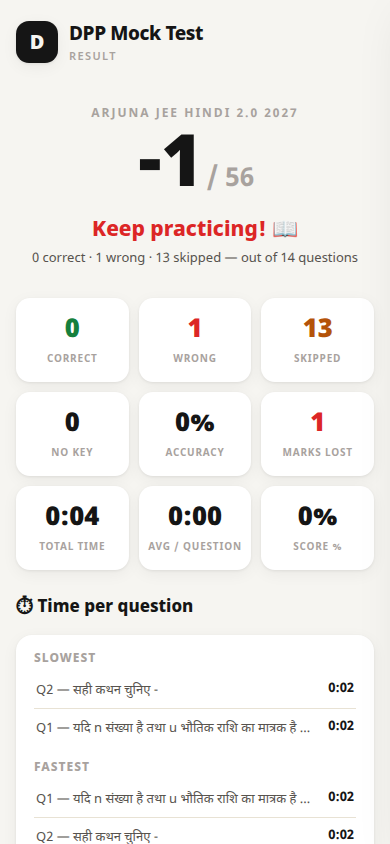
Real screenshots from the app, on a real DPP (Arjuna JEE Hindi 2.0, Physics — Units & Measurements).
Built for real exam prep
Everything a DPP test needs — nothing it does not.
⏱ NTA-style test screen
Timer, subject tabs, and the 5-state question palette (answered, not answered, marked, answered & marked, not visited) — the same layout as the real JEE mock.
✏️ Preview & edit first
Every question is shown before the test. Fix text, options or keys by hand, delete bad questions, add your own. A wrong read never becomes a wrong test.
📊 Result & history
Score, correct / wrong / skipped, accuracy, marks lost to negative marking, slowest and fastest questions, and a full question-wise review. Past tests stay in history on your phone.
🔢 Multi-correct & numeric
Questions with more than one correct option (A, B, C) and numeric-answer questions are read and scored properly — not forced into one-option boxes.
📴 Fully offline
Parsing, the test, the timer and your history all run on your phone. No internet needed after install. No account, no sign-in, no data sent anywhere.
🌍 Hindi · English · اردو
Reads DPPs in Devanagari, English and Urdu (right-to-left). Scanned or photo PDFs can be read with built-in OCR — Hindi, English and Urdu.
Install in two minutes
Pariksha is not on the Play Store yet, so Android asks once before installing an app from the web. That is normal.
- Download the APK from the button above (10.2 MB).
- Tap the downloaded file. If Android says “Install unknown apps”, allow it for your browser — just this once.
- Open Pariksha and upload a DPP. That is it.
Honest limits
What Pariksha cannot do yet — said plainly, so you are not surprised.
Some Hindi words still show a wrong or missing letter
Some coaching PDFs use a font whose Devanagari ligatures (like म्ब, ख्य, ज्ञ) have no proper text mapping. Pariksha repairs the common science words automatically and tells you how many letters it could not read — but a few can still slip through. Fix them in the preview screen before starting.
Maths and formulas can look flattened
Superscripts, fractions and square roots in a PDF are stored as plain text, so “10⁸” can read as “108” and a formula can split across lines. The question and its options still come through — check the numbers in the preview.
Questions with pictures or graphs are skipped
If a question’s options are an image or a graph, the app skips that question and tells you its number. It never guesses an answer for it. You can add it by hand in the preview.
Scanned or photo PDFs need OCR — and it is best-effort
If a PDF has no text layer, the app offers to read it with OCR (Hindi, English, Urdu — all on your phone). OCR reads the text, but on the PW Hindi font some question numbers and option letters can be misread, so a scanned paper may need hand-fixing in the preview.
The app does not invent questions from notes
Pariksha makes tests from question papers — files that already have MCQs and (ideally) an answer key. If a file has no questions (class notes, a solution sheet), it says so clearly instead of making questions up.
I installed the earlier debug APK — what now?
Uninstall the debug version first. Android will not install this release over a debug-signed app (different signing key). Your old test history lives in the debug app and will not carry over.
Verify your download
Check the file you downloaded is the real one — compare its SHA-256 with this.
SHA-256:
ff9de1d9fb063c543bfaac7e1c1b6e49e0fd370f559468fcb0e9ceab0acfd3adSigned by: Ahmad Raza, Ahmad Studio (CN=Ahmad Raza, OU=Ahmad Studio, O=Ahmad Studio, L=Bihar, ST=Bihar, C=IN)
Your next DPP is already a mock test.
Free forever. No account. No ads. Works offline.
⬇ Download Pariksha — free10.2 MB · Android 7.0+